
What is Agentforce Session Tracing?
Agentforce Session Tracing records the conversation and execution steps behind an agent response. Use it to connect a user request to the selected subagent, action calls, and results, then locate the first step that failed or departed from the expected behavior.
A fluent response can hide the wrong route, stale grounding, an omitted action, or a recovered error. Session tracing exposes the execution path behind the conversation so teams can investigate behavior with evidence.
The trace should be read as an ordered operational record: what the agent received, which subagent and actions it selected, how variables changed, what tools returned, and how long each step took.
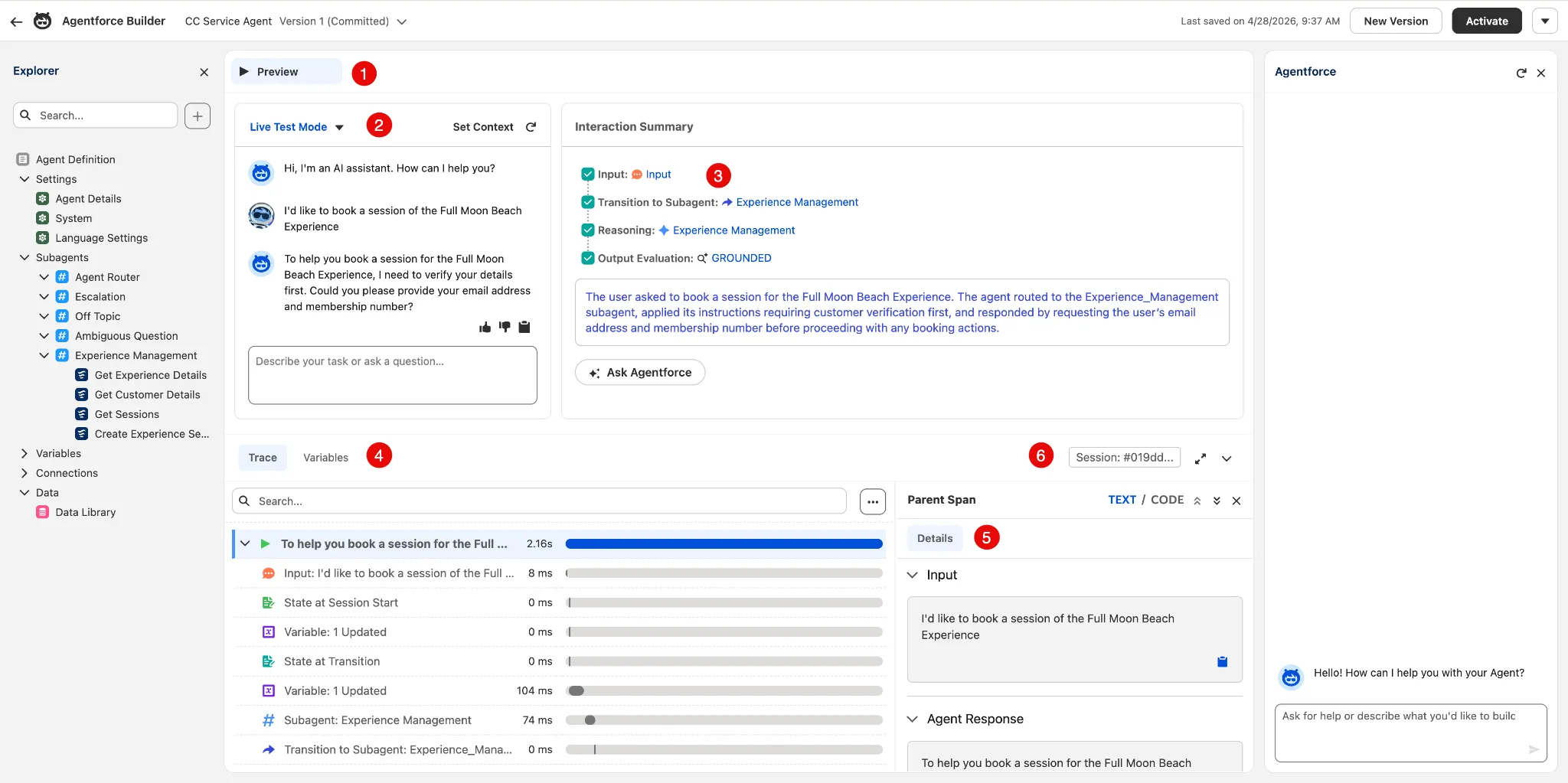
How to read an Agentforce session trace
Choose a single request with a known expected outcome. Record the agent version, channel, execution user, and session identifier alongside it. An administrator's preview is useful for debugging, but does not replace testing the permissions of the deployed agent.
- Start at the conversation turn. Compare the actual user request with the selected subagent and intended job. A plausible final answer can still follow the wrong route.
- Follow the action sequence. Inspect available inputs and outputs in order. Find the earliest wrong value, omitted action, or failed result instead of starting with the wording of the response.
- Separate retrieval from execution. A wrong knowledge answer points toward sources, retrieval, or instructions. A rejected update points toward action inputs, permissions, business validation, or the downstream system.
- Retest the failing path. Capture a sanitized reproduction, change the responsible layer, and add both the failure and an allowed case to the regression suite.
Use the testing strategy to turn an investigation into repeatable evidence. Avoid copying customer data from traces into unrestricted tickets.
Agentforce Session Tracing data model
Salesforce stores session tracing data in Data 360. For custom reports, use the mapped data model objects (DMOs), rather than querying the underlying data lake objects directly. The main relationships are:
| Object | What it represents |
|---|---|
AIAgentSession | The session containing the conversation. |
AIAgentInteraction | A turn within that session. |
AIAgentInteractionStep | An operation performed within a turn. |
AIAgentInteractionMessage | A message associated with an interaction. |
AIAgentSessionParticipant | A human or agent participating in the session. |
A session has many interactions and participants. An interaction has many steps and messages. Each message references its sender. Use the official field and relationship reference when building joins; display labels are not a substitute for the API names in your org.
For deeper action diagnostics, Agent Platform Tracing adds an OpenTelemetry span tree for instrumented execution. This complements the conversation-level view. Enable it in Setup, verify Data 360 and trace access, then run a new action: the feature does not backfill historical spans.
Worked example: an order lookup fails
Illustrative investigation, not an exported Salesforce trace. The action names and values below are examples.
| Observed step | Evidence | Next check |
|---|---|---|
| Route request | Customer asks for order status; the order-support subagent is selected. | Confirm this is the expected route. |
| Call lookup action | The action receives an empty order reference. | Check variable assignment and the action input mapping. |
| Return result | No order is returned; the response claims the order does not exist. | Require a missing-input response instead of treating failure as a valid empty result. |
The first divergence is the missing action input. Fix that mapping and add a test for an absent order reference. Also verify that a valid reference cannot retrieve another customer's order. Improving the final prompt alone would leave both execution and authorization questions unresolved.
What to check when trace data is missing
- Capture and timing: confirm the relevant tracing feature is enabled, generate a new test session, and allow for ingestion. A missing row immediately after a request is not proof that the request never ran.
- Access and scope: verify the investigator can read the appropriate Data 360 objects and is looking at the correct org, agent, session, and time range.
- Ingestion: if the expected session data is absent, inspect the associated Problem Record DLOs as described in Salesforce's data model documentation.
For production access, retention, and escalation responsibilities, use the trace operations runbook. For preserving investigation evidence, continue to audit trail governance.
Resources
This article is based on the following Salesforce learning and product documentation.