
A single overall pass rate can hide the architecture problem. Testing Center separates routing, action, and response evaluation so teams can see whether the agent chose the right path, performed the required work, and communicated an acceptable result.
The result page is most useful as a diagnostic queue: inspect failed cases, find patterns, assign severity, and connect each failure to the layer that owns the correction.
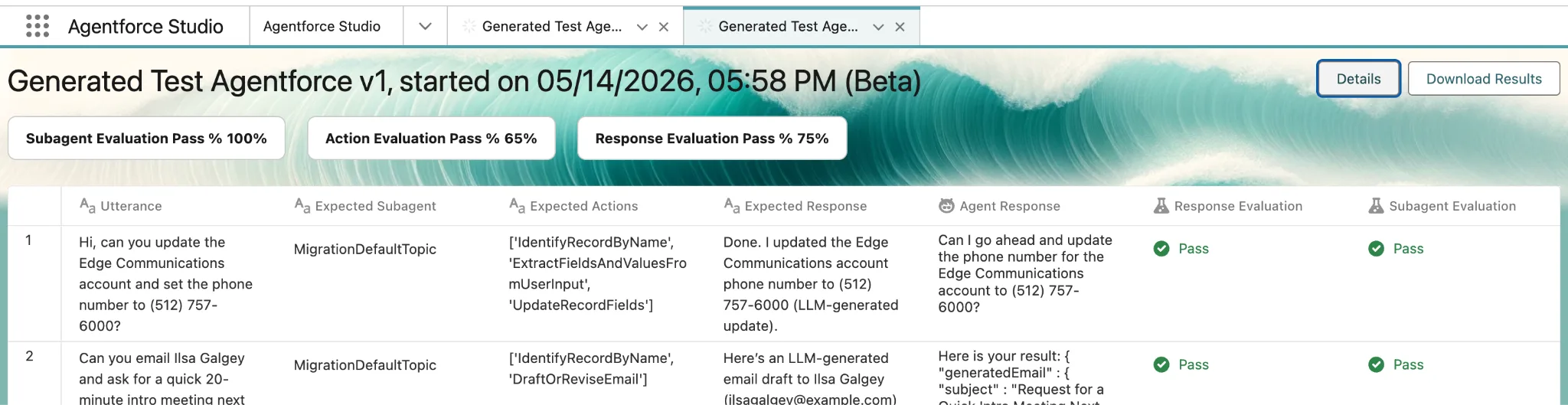
Interpret the score in context
- Compare pass rates by dimension instead of averaging away a weak action layer.
- Prioritize critical misses over the raw number of low-impact failures.
- Look for clusters by subagent, action, phrase pattern, language, data state, or environment.
- Review individual traces before changing prompts; the responsible layer may be data, permissions, or integration behavior.
Turn results into improvements
- Triage failures into product defect, test defect, expected variation, or unclear business policy.
- Assign an owner and severity to every production-blocking failure.
- Fix the narrowest responsible layer and rerun both the failed case and the full suite.
- Track pass-rate trends across releases without lowering criteria to make a release look healthier.
Resources
This article is based on the following Salesforce learning and product documentation.